Payload terminal
Name: Payload Terminal
Description: Payload terminal where teams have to escort a payload to the end of a path.
Version: v2.0
Author: Omega77073
Compatibility: >=2.0.0
Supports debug: true
A payload terminal where teams have to escort a payload to the end of a path.
Installation
1. Get the model
Find a file with the model here
2. Move the model
Place the model in Main folder > Addons
3. In the Server script add before loading addons:
wrapper:LoadTerminal(script.Parent.Addons["Terminal-Payload"])
4. Create a path
A payload path is a folder containing waypoints (parts), it starts with a waypoint named START and ends with a waypoint named END.
Each waypoint, except the final one should have an ObjectValue child named Next pointing to the next waypoint in the path.
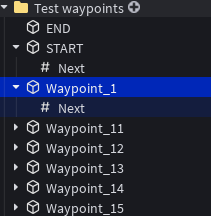
5. Prepare your payload model
Your payload model should have a Primary Part set to a part that represents the zone of the payload, it will also be used as the anchor point of the model.
6. Configure the terminal
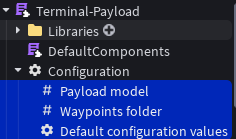
- Set the payload path by setting the
PayloadPathObjectValue to the folder containing the waypoints. - Set the payload model by setting the
PayloadModelModelValue to the model representing the payload. - Edit default settings as you wish by editing the attributes of
Configuration > Default configuration values
You're done !
It is recommended to use the Network optimization addon when using this terminal to reduce network usage drastically.
Components
-- See the DefaultComponents module script for reference
function components.updateProgress(terminal: terminal, tickRate: number): { newProgress: number }

function components.movePayloadModel(terminal: terminal, newCFrame: CFrame)

function components.getPlayerCount(terminal: terminal,tickRate: number): { AttackersCount: number, DefendersCount: number }

function components.computeState(terminal: terminal): "locked" | "attacker" | "defender" | "neutral"

function components.getWinner(terminal): "attackers" | "defenders" | "draw" | nil

function components.activateWaypoint(terminal: terminal, waypointIndex: number)
Path events
The payload terminal supports additionnal waypoints events for control over the path behavior.
Add a BindableEvent inside a waypoint and it will be fired when the payload reaches that waypoint with the following data:
{
    {
 		waypointIndex : number, -- index of the waypoint reached
 		distanceToWaypoint = number, -- distance from the payload to the waypoint

 		forwardSpeed : number -- speed of the payload forward in the config
 		backwardSpeed : number -- speed of the payload backward in the config

 		progress : number, -- current progress of the payload
 		state : "locked" | "attacker" | "defender" | "neutral", -- current state of the payload

 		timeLeft : number, -- time left in seconds for the terminal
 	}
}
Add a StringValuenamed Instructions inside a waypoint to give instructions to the terminal when the payload reaches that waypoint.
An instruction string is a JSON formatted list of actions to perform, currently supported actions are:
| Action | parameters | Description |
|---|---|---|
wait | time: number | makes the terminal wait for the specified time in seconds before being unlocked |
lock | none | locks the terminal until manually unlocked |
moveProgress | progress: number | moves the payload by the specified progress amount |
moveDistance | distance: number | moves the payload by the specified distance amount |
moveTime | time: number | moves the payload for the specified time in seconds |
setAsMinimumProgress | none | sets the current progress as the minimum progress, the payload won't be able to move backward past this point. Useful for doors closing behind the payload |
Example instruction strings:
[
    {"action":"wait","value":5},
    {"action":"moveDistance","value":40}
]
[
    {"action":"setAsMinimumProgress"}
]
Events
| Event Name | Parameters | Description |
|---|---|---|
| playerCountChanged | attackersCount, defendersCount | Fired when the player count changes |
| progressChanged | newProgress | Fired when the payload moves |
| stateChanged | newState | Fired when the terminal's state changes |
| endEvent | winner | Fired when the terminal ends |
| startEvent | Fired when the terminal starts | |
| partialUpdate | A list of changed properties, used for replication |